Apple Pickup Watcher
Apple Store pickup stock monitor
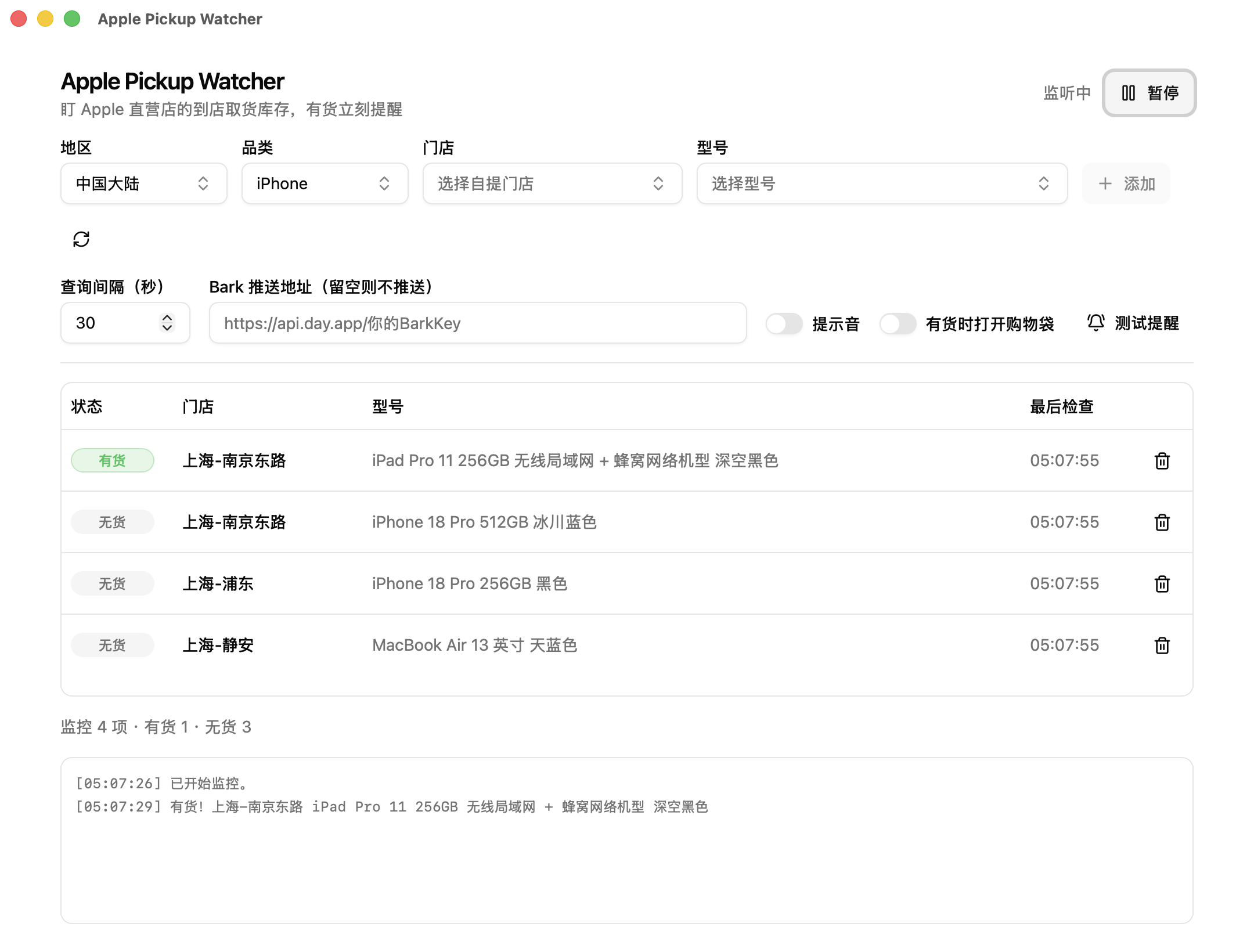
Choose a model and a pickup store. The app checks availability periodically and alerts you through desktop notifications, sound or Bark when it finds stock. Free and open source for macOS, Windows and Linux.
Download
Installers are published on GitHub Releases. Choose the package for your operating system and processor.
| System | Package | Download |
|---|---|---|
| macOS | Apple Silicon / Intel · DMG | Download |
| Windows | x64 · EXE / MSI | Download |
| Linux | x86_64 · AppImage / DEB / RPM | Download |
The macOS app is not notarized by Apple, and Windows installers are not code-signed. If your system blocks the app, see the installation instructions.
Supported products and regions
- Products
- iPhone / iPad / Mac / Apple Watch
- Regions
- China mainland, Hong Kong, Taiwan, Japan, Singapore, Australia and Malaysia.
Individual models and stores depend on the app catalog and the regional Apple online store. The catalog can refresh from supported purchase pages; a new purchase-page route needs an app update. Region support does not guarantee every query will succeed.
Getting started
- Add a target. Choose a region, product family, store and model. You can watch multiple models at different stores.
- Test notifications and start. Use the test notification control to check sound and push settings. The default polling interval is 30 seconds.
- Buy on Apple’s website. The app can open your shopping bag if enabled. Add the item, select a pickup store, check out and pay manually.
Monitoring and alerts
- Background monitoring
- Closing the window moves the app to the system tray, where it keeps checking and notifying. Keep the app running and your computer awake and online.
- Stock status
- Available, unavailable, unknown and pending states are displayed separately. A failed query shows its reason instead of being reported as out of stock.
- Notifications
- Desktop notifications, sound and optional Bark push are supported. Continuous availability does not trigger an alert every cycle. A target that leaves and re-enters the available state triggers a new alert.
- CLI and agent skill
- The standalone apw command prints JSON and its watch mode streams NDJSON, with no desktop environment required. A bundled skill lets Codex-style agents query stock or wait for a restock. The CLI itself shows no popups, sends no pushes and places no orders.
Frequently asked questions
Does it automatically buy or reserve a device?
No. It checks pickup availability and sends alerts. It can optionally open your shopping bag, but you add items, select a pickup store, check out and pay manually on Apple’s website. Stock may change after an alert. The app does not reserve stock or guarantee a purchase.
Will alerts work after I close the window?
Yes. Closing the window moves the app to the system tray, where it keeps checking and notifying. The app must stay running and your computer must stay awake and online. Quitting from the tray stops monitoring.
What do unknown and HTTP 541 mean?
Out of stock means a query returned a recognized unavailable pickup result. Unknown means the query could not establish availability, for example due to a network failure, rate limit, block or changed response. Treat HTTP 541 as a failed query, not evidence of no stock. Its cause requires logs and network context.
Can I receive restock alerts on my phone?
Yes, with the optional Bark notification channel. Install Bark on your iPhone, enter your own Bark push URL in the app settings, then send a test notification. A failed push does not change the stock status.
Is this an official Apple application?
No. Apple Pickup Watcher is an independent open-source project, unaffiliated with and not endorsed by Apple Inc. It is a Rust + Tauri rewrite of hteen/apple-store-helper. Attribution and copyright details are in the repository NOTICE.
Documentation and feedback
The README contains full setup instructions. Report problems on GitHub Issues with the app version, region and logs with personal information removed.